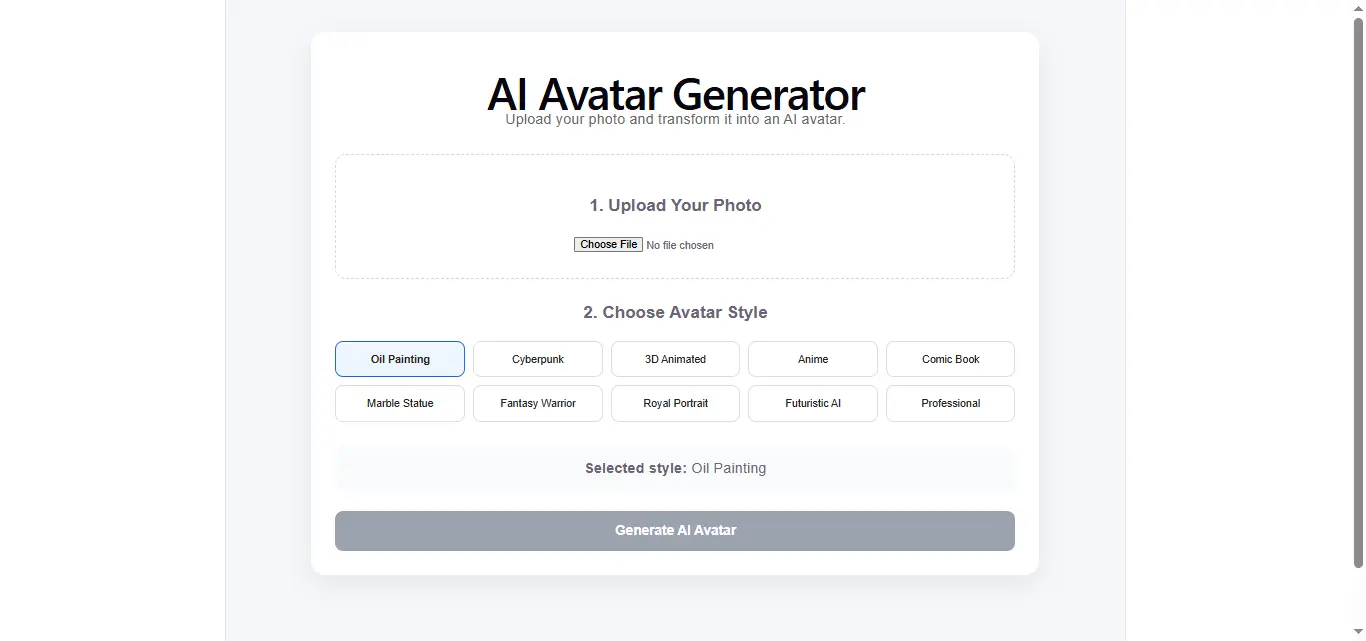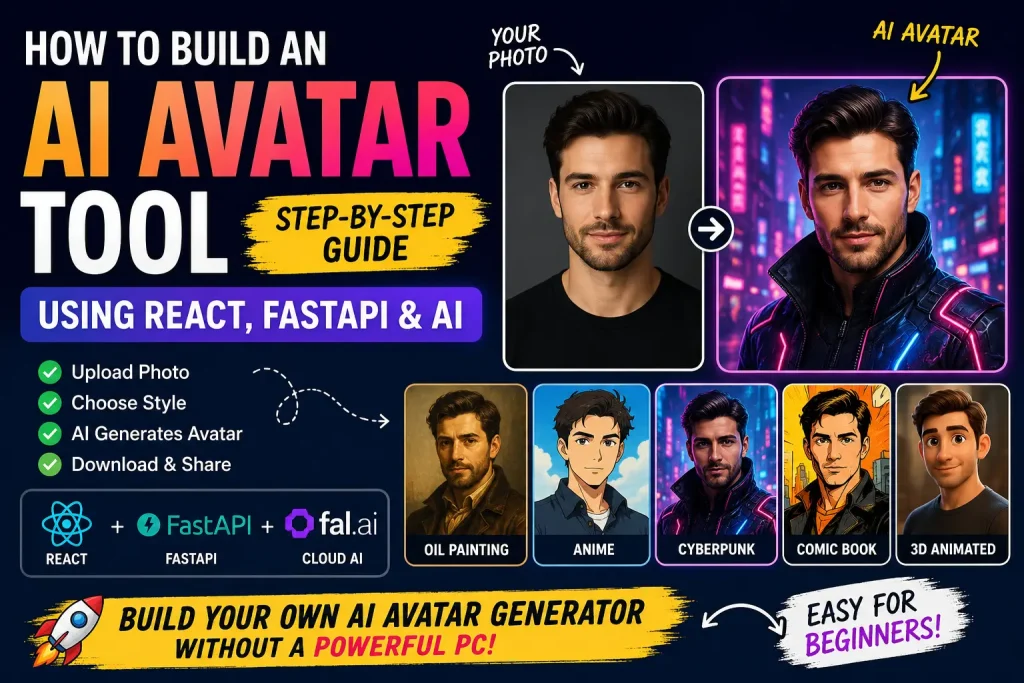
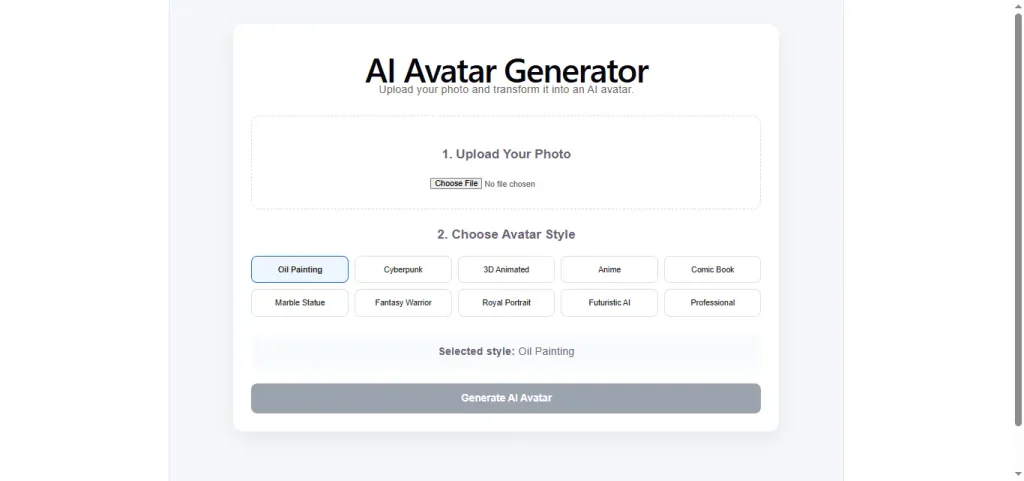
In this artical, we will build a simple AI Avatar tool that allows users to upload an image, select an avatar style, and generate a new AI avatar for there Social appearances. The application will use React , FastAPI , and AI model for image generation, so you don’t need a powerful GPU on your computer. Soo Lets start
Here are what we are building:
complete work flow
User
↓
Upload Image
↓
Select Avatar Style
↓
React
↓
FastAPI
↓
Cloud AI Model
↓
Generated Avatar
↓
Download
AI Model
So for this we are using fal.ai for this tool somehow you can use Hugging Face ,Replicate , Google Gemini image models , Together AI.
The main reason i am using fal because it gives free $5 credits on account creation that is why i am using this model
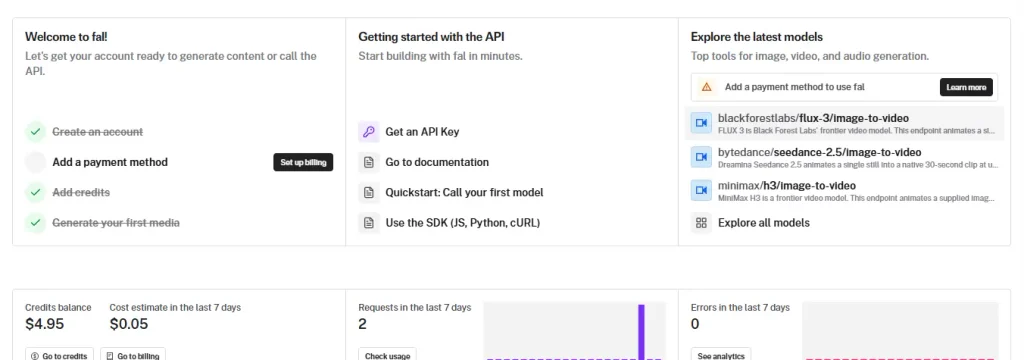
- Create an account.
- Generate an API key.
- Save the key.
Create the AI-avatar tool
- Create the Project
First of all you have a create a project in which there are main project name like ai-avatar-tool > backend and frondend
folders
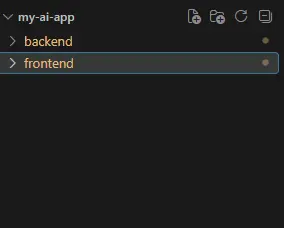
next we have to install the react and python on the folders like in frontend we have to install the
npm create vite@latest frontendusing this command we can install the react in the folder
and then in the backend > main.py
python -m venv venv
venv\Scripts\activate
pip install fastapi uvicorn python-multipart pillow fal-client requests
after that we have to configure the api key in the powershell you can also add the api key in the code
$env:FAL_KEY="YOUR_FAL_KEY"and this is the backend > main.py code
import os
import io
import base64
import asyncio

from fastapi import FastAPI, HTTPException, UploadFile, File, Form
from fastapi.middleware.cors import CORSMiddleware
from PIL import Image
import fal_client

app = FastAPI(title="AI Avatar Generator")

app.add_middleware(
    CORSMiddleware,
    allow_origins=["*"],
    allow_credentials=True,
    allow_methods=["*"],
    allow_headers=["*"],
)

FAL_KEY = os.getenv("FAL_KEY")

if not FAL_KEY:
    print("WARNING: FAL_KEY environment variable is not set.")

os.environ["FAL_KEY"] = FAL_KEY or ""

MODEL = "fal-ai/flux-kontext/dev"


@app.get("/")
def read_root():
    return {
        "status": "AI Avatar Backend Active",
        "model": MODEL
    }


@app.post("/generate-avatar")
async def generate_avatar(
    prompt: str = Form(...),
    file: UploadFile = File(...)
):
    if not FAL_KEY:
        raise HTTPException(
            status_code=500,
            detail="FAL_KEY is not configured on the server."
        )

    if not file.content_type or not file.content_type.startswith("image/"):
        raise HTTPException(
            status_code=400,
            detail="Please upload a valid image."
        )

    try:
        image_bytes = await file.read()

        if not image_bytes:
            raise HTTPException(
                status_code=400,
                detail="Uploaded image is empty."
            )

        if len(image_bytes) > 10 * 1024 * 1024:
            raise HTTPException(
                status_code=400,
                detail="Image must be smaller than 10MB."
            )

        try:
            image = Image.open(io.BytesIO(image_bytes)).convert("RGB")
        except Exception:
            raise HTTPException(
                status_code=400,
                detail="Unable to read the uploaded image."
            )

        image.thumbnail((1024, 1024))

        buffer = io.BytesIO()
        image.save(buffer, format="JPEG", quality=90)
        buffer.seek(0)

        print("Uploading image to fal.ai...")

        image_url = await asyncio.to_thread(
            fal_client.upload,
            buffer.getvalue(),
            "image/jpeg"
        )

        final_prompt = f"""
Use the uploaded image as the primary visual and identity reference.

Transform the person in the uploaded image into a professional AI avatar.

Preserve the person's recognizable identity, facial structure,
face shape, eyes, nose, lips, hairstyle, skin tone, age appearance,
and natural facial proportions.

Do not turn the person into a different person.
Do not unnecessarily change their facial identity.

Apply this artistic style:

{prompt}

The person's face should remain clearly recognizable.
Create a polished high-quality portrait.
Sharp facial details.
Natural anatomy.
Professional composition.
Cinematic lighting.
Detailed rendering.
Clean background.
High-quality AI avatar.
"""

        print("Generating avatar with fal.ai...")
        print(f"Style: {prompt}")

        result = await asyncio.to_thread(
            fal_client.run,
            MODEL,
            arguments={
                "prompt": final_prompt,
                "image_url": image_url,
                "aspect_ratio": "1:1",
                "output_format": "png",
                "guidance_scale": 3.5,
                "num_images": 1
            }
        )

        print("fal.ai generation completed.")

        images = result.get("images", [])

        if not images:
            raise Exception("fal.ai did not return an image.")

        generated_url = images[0].get("url")

        if not generated_url:
            raise Exception("Generated image URL was not returned.")

        import requests

        generated_response = await asyncio.to_thread(
            requests.get,
            generated_url,
            timeout=60
        )

        if generated_response.status_code != 200:
            raise Exception(
                f"Could not download generated image: "
                f"{generated_response.status_code}"
            )

        output_base64 = base64.b64encode(
            generated_response.content
        ).decode("utf-8")

        return {
            "success": True,
            "avatar": f"data:image/png;base64,{output_base64}",
            "model": MODEL
        }

    except HTTPException:
        raise

    except Exception as e:
        print("Avatar generation error:", str(e))

        raise HTTPException(
            status_code=500,
            detail=f"Avatar generation failed: {str(e)}"
        )
this is our main prompt to make the image to avatar
final_prompt = f”””
Use the uploaded image as the primary visual and identity reference.
Transform the person in the uploaded image into a professional AI avatar.
Preserve the person’s recognizable identity, facial structure,
face shape, eyes, nose, lips, hairstyle, skin tone, age appearance,
and natural facial proportions.
Do not turn the person into a different person.
Do not unnecessarily change their facial identity.
Apply this artistic style:
{prompt}
The person’s face should remain clearly recognizable.
Create a polished high-quality portrait.
Sharp facial details.
Natural anatomy.
Professional composition.
Cinematic lighting.
Detailed rendering.
Clean background.
High-quality AI avatar.
“””
you can change it according to your then this is app.jsx code for the tool.
import React, { useState } from "react";

const styles = [
  {
    name: "Oil Painting",
    prompt:
      "Transform the person into a premium classical oil painting avatar. Elegant realistic brushwork, rich painterly textures, sophisticated lighting, subtle canvas texture, museum-quality portrait."
  },
  {
    name: "Cyberpunk",
    prompt:
      "Transform the person into a futuristic cyberpunk avatar. Neon blue and magenta lighting, futuristic city atmosphere, subtle technological details, cinematic rim lighting, sharp facial details, premium digital artwork."
  },
  {
    name: "3D Animated",
    prompt:
      "Transform the person into a high-quality 3D animated character avatar. Stylized but natural proportions, expressive eyes, smooth detailed 3D materials, cinematic studio lighting, polished animated character rendering."
  },
  {
    name: "Anime",
    prompt:
      "Transform the person into a premium anime-style avatar. Detailed anime facial design, clean linework, expressive eyes, beautiful cel shading, cinematic lighting, polished digital illustration, vibrant balanced colors."
  },
  {
    name: "Comic Book",
    prompt:
      "Transform the person into a high-end comic book character avatar. Bold ink outlines, detailed facial features, dynamic comic-book shading, dramatic cinematic lighting, subtle halftone texture, rich colors."
  },
  {
    name: "Marble Statue",
    prompt:
      "Transform the person into a highly detailed classical Greek marble bust. White Carrara marble texture, realistic sculpted details, elegant classical proportions, subtle stone imperfections, museum-quality sculpture."
  },
  {
    name: "Fantasy Warrior",
    prompt:
      "Transform the person into an epic fantasy warrior avatar. Detailed fantasy armor, cinematic lighting, dramatic atmosphere, realistic textures, subtle magical elements, powerful character presence, premium cinematic concept art."
  },
  {
    name: "Royal Portrait",
    prompt:
      "Transform the person into an elegant royal portrait. Luxurious royal clothing, sophisticated historical styling, rich fabric textures, elegant studio lighting, classical composition, refined color grading."
  },
  {
    name: "Futuristic AI",
    prompt:
      "Transform the person into a sophisticated futuristic AI avatar. Sleek futuristic design, subtle holographic elements, advanced technology aesthetic, cinematic lighting, realistic skin texture, premium sci-fi character portrait."
  },
  {
    name: "Professional",
    prompt:
      "Transform the person into a premium professional profile avatar. Professional studio photography, soft cinematic lighting, clean elegant background, realistic skin texture, sharp eyes, natural expression, polished appearance."
  }
];

export default function App() {
  const [file, setFile] = useState(null);
  const [selectedStyle, setSelectedStyle] = useState(styles[0]);
  const [avatarSrc, setAvatarSrc] = useState(null);
  const [previewSrc, setPreviewSrc] = useState(null);
  const [loading, setLoading] = useState(false);
  const [error, setError] = useState("");

  const handleFileChange = (event) => {
    const selectedFile = event.target.files?.[0];

    if (!selectedFile) {
      return;
    }

    if (!selectedFile.type.startsWith("image/")) {
      setError("Please select a valid image.");
      return;
    }

    if (selectedFile.size > 10 * 1024 * 1024) {
      setError("Image must be smaller than 10MB.");
      return;
    }

    setFile(selectedFile);
    setError("");
    setAvatarSrc(null);

    const reader = new FileReader();

    reader.onload = () => {
      setPreviewSrc(reader.result);
    };

    reader.readAsDataURL(selectedFile);
  };

  const handleGenerate = async () => {
    if (!file) {
      setError("Please upload a photo first.");
      return;
    }

    setLoading(true);
    setError("");
    setAvatarSrc(null);

    const formData = new FormData();

    formData.append("file", file);
    formData.append("prompt", selectedStyle.prompt);

    try {
      const response = await fetch(
        "http://127.0.0.1:8000/generate-avatar",
        {
          method: "POST",
          body: formData
        }
      );

      const data = await response.json();

      if (!response.ok) {
        throw new Error(
          data.detail || `Server error: ${response.status}`
        );
      }

      if (!data.avatar) {
        throw new Error("The server did not return an avatar.");
      }

      setAvatarSrc(data.avatar);
    } catch (err) {
      console.error(err);

      setError(
        err.message ||
          "Failed to generate avatar. Please check your FastAPI server."
      );
    } finally {
      setLoading(false);
    }
  };

  const handleDownload = () => {
    if (!avatarSrc) {
      return;
    }

    const link = document.createElement("a");

    link.href = avatarSrc;
    link.download = "ai-avatar.png";

    document.body.appendChild(link);
    link.click();
    document.body.removeChild(link);
  };

  return (
    <div
      style={{
        minHeight: "100vh",
        background: "#f5f7fb",
        padding: "40px 20px",
        fontFamily: "Arial, sans-serif"
      }}
    >
      <div
        style={{
          maxWidth: "850px",
          margin: "0 auto",
          background: "#ffffff",
          borderRadius: "18px",
          padding: "30px",
          boxShadow: "0 10px 35px rgba(0,0,0,0.08)"
        }}
      >
        <h1
          style={{
            textAlign: "center",
            marginBottom: "8px"
          }}
        >
          AI Avatar Generator
        </h1>

        <p
          style={{
            textAlign: "center",
            color: "#666",
            marginBottom: "30px"
          }}
        >
          Upload your photo and transform it into an AI avatar.
        </p>

        <div
          style={{
            border: "2px dashed #d5d9e2",
            borderRadius: "14px",
            padding: "30px",
            textAlign: "center",
            marginBottom: "30px"
          }}
        >
          <h3>1. Upload Your Photo</h3>

          <input
            type="file"
            accept="image/png,image/jpeg,image/webp"
            onChange={handleFileChange}
          />

          {previewSrc && (
            <div style={{ marginTop: "20px" }}>
              <img
                src={previewSrc}
                alt="Uploaded"
                style={{
                  width: "180px",
                  height: "180px",
                  objectFit: "cover",
                  borderRadius: "12px",
                  border: "1px solid #ddd"
                }}
              />

              <p
                style={{
                  fontSize: "13px",
                  color: "#555"
                }}
              >
                {file?.name}
              </p>
            </div>
          )}
        </div>

        <div style={{ marginBottom: "30px" }}>
          <h3>2. Choose Avatar Style</h3>

          <div
            style={{
              display: "grid",
              gridTemplateColumns:
                "repeat(auto-fit, minmax(150px, 1fr))",
              gap: "10px"
            }}
          >
            {styles.map((style) => {
              const active =
                selectedStyle.name === style.name;

              return (
                <button
                  key={style.name}
                  onClick={() => setSelectedStyle(style)}
                  style={{
                    padding: "14px 10px",
                    borderRadius: "10px",
                    border: active
                      ? "2px solid #2563eb"
                      : "1px solid #ddd",
                    background: active
                      ? "#eff6ff"
                      : "#ffffff",
                    color: "#222",
                    cursor: "pointer",
                    fontWeight: active ? "bold" : "normal"
                  }}
                >
                  {style.name}
                </button>
              );
            })}
          </div>
        </div>

        <div
          style={{
            background: "#f8fafc",
            padding: "15px",
            borderRadius: "10px",
            marginBottom: "25px"
          }}
        >
          <strong>Selected style:</strong>{" "}
          {selectedStyle.name}
        </div>

        <button
          onClick={handleGenerate}
          disabled={loading || !file}
          style={{
            width: "100%",
            padding: "16px",
            border: "none",
            borderRadius: "10px",
            background:
              loading || !file ? "#9ca3af" : "#2563eb",
            color: "#ffffff",
            fontSize: "17px",
            fontWeight: "bold",
            cursor:
              loading || !file
                ? "not-allowed"
                : "pointer"
          }}
        >
          {loading
            ? "Generating AI Avatar..."
            : "Generate AI Avatar"}
        </button>

        {error && (
          <div
            style={{
              marginTop: "20px",
              padding: "12px",
              borderRadius: "8px",
              background: "#fee2e2",
              color: "#b91c1c"
            }}
          >
            {error}
          </div>
        )}

        {loading && (
          <div
            style={{
              textAlign: "center",
              marginTop: "30px",
              color: "#555"
            }}
          >
            <p>
              AI is transforming your photo...
            </p>

            <p style={{ fontSize: "13px" }}>
              This may take a little while because the
              image is being generated in the cloud.
            </p>
          </div>
        )}

        {avatarSrc && !loading && (
          <div
            style={{
              marginTop: "35px",
              textAlign: "center"
            }}
          >
            <h2>Your AI Avatar</h2>

            <img
              src={avatarSrc}
              alt="Generated AI Avatar"
              style={{
                width: "350px",
                height: "350px",
                maxWidth: "100%",
                objectFit: "cover",
                borderRadius: "20px",
                border: "5px solid #ffffff",
                boxShadow:
                  "0 10px 30px rgba(0,0,0,0.15)"
              }}
            />

            <div style={{ marginTop: "20px" }}>
              <button
                onClick={handleDownload}
                style={{
                  padding: "12px 25px",
                  border: "none",
                  borderRadius: "8px",
                  background: "#16a34a",
                  color: "#ffffff",
                  fontSize: "15px",
                  fontWeight: "bold",
                  cursor: "pointer"
                }}
              >
                Download Avatar
              </button>
            </div>
          </div>
        )}
      </div>
    </div>
  );
}
const styles = [
{
name: "Oil Painting",
prompt:
"Transform the person into a premium classical oil painting avatar. Elegant realistic brushwork, rich painterly textures, sophisticated lighting, subtle canvas texture, museum-quality portrait."
},
{
name: "Cyberpunk",
prompt:
"Transform the person into a futuristic cyberpunk avatar. Neon blue and magenta lighting, futuristic city atmosphere, subtle technological details, cinematic rim lighting, sharp facial details, premium digital artwork."
},
{
name: "3D Animated",
prompt:
"Transform the person into a high-quality 3D animated character avatar. Stylized but natural proportions, expressive eyes, smooth detailed 3D materials, cinematic studio lighting, polished animated character rendering."
},
{
name: "Anime",
prompt:
"Transform the person into a premium anime-style avatar. Detailed anime facial design, clean linework, expressive eyes, beautiful cel shading, cinematic lighting, polished digital illustration, vibrant balanced colors."
},
{
name: "Comic Book",
prompt:
"Transform the person into a high-end comic book character avatar. Bold ink outlines, detailed facial features, dynamic comic-book shading, dramatic cinematic lighting, subtle halftone texture, rich colors."
},
{
name: "Marble Statue",
prompt:
"Transform the person into a highly detailed classical Greek marble bust. White Carrara marble texture, realistic sculpted details, elegant classical proportions, subtle stone imperfections, museum-quality sculpture."
},
{
name: "Fantasy Warrior",
prompt:
"Transform the person into an epic fantasy warrior avatar. Detailed fantasy armor, cinematic lighting, dramatic atmosphere, realistic textures, subtle magical elements, powerful character presence, premium cinematic concept art."
},
{
name: "Royal Portrait",
prompt:
"Transform the person into an elegant royal portrait. Luxurious royal clothing, sophisticated historical styling, rich fabric textures, elegant studio lighting, classical composition, refined color grading."
},
{
name: "Futuristic AI",
prompt:
"Transform the person into a sophisticated futuristic AI avatar. Sleek futuristic design, subtle holographic elements, advanced technology aesthetic, cinematic lighting, realistic skin texture, premium sci-fi character portrait."
},
{
name: "Professional",
prompt:
"Transform the person into a premium professional profile avatar. Professional studio photography, soft cinematic lighting, clean elegant background, realistic skin texture, sharp eyes, natural expression, polished appearance."
}
];these are your prompts thatwill be in select from the user